
|
|||
|


 |
|

 |
|

| Home |
| About |
| Hobbies |
| Software |
| Hardware |
| ICT Hotlist |
| Purpose |
React:


Acer Veriton M200p500 Datasheet Pdf New [exclusive] May 2026
 Back to the ICT-Hotlist...
How to retrieve your FTP passwords from FileZilla
You probably once got an e-mail with the FTP settings for a download site, entered the credentials in FileZilla, lost the mail and now someone else needs the FTP account. Or you got a new PC assigned and suddenly need to FTP a bug report, noticing your sites and passwords are not transferred to the new PC. Of course you can contact your ftp partner, fill out a few forms, send them in and wait a few days whilst your boss gets angry behind your back when the sales system grinds to a halt.As you by now know from reading all the other tips, they do not work as FileZilla now encrypts the password in the configuration file.
These are the steps to get your password with the current versions of FileZilla.
- Open the file explorer and paste the path %AppData%/filezilla in the address bar and open the file sitemanager.xml in Notepad or your favorite text editor (NotePad++)
- Search for the section containing the ftp site. See for an example the next text box.
<Server>
<Host>ftp.van_Soest.it</Host>
<Port>21</Port>
<Protocol>0</Protocol>
<Type>0</Type>
<User>Johan</User>
<Pass encoding="base64">VGhpc0lzQVRlc3RQYXNzd29yZA==</Pass>
<Logontype>1</Logontype>
<TimezoneOffset>0</TimezoneOffset>
<PasvMode>MODE_DEFAULT</PasvMode>
<MaximumMultipleConnections>0</MaximumMultipleConnections>
<EncodingType>Auto</EncodingType>
<BypassProxy>0</BypassProxy>
<Name>ftp://ftp.van_Soest.it</Name>
<Comments />
<LocalDir />
<RemoteDir />
<SyncBrowsing>0</SyncBrowsing>
<DirectoryComparison>0</DirectoryComparison>ftp://ftp.van_Soest.it
</Server>
An example of a FileZilla server configuration. - You now can find the password in the line.
<Pass encoding="base64">VGhpc0lzQVRlc3RQYXNzd29yZA==</Pass>Notice the encoding type "base64". This explains the encoding type used to encrypt the password.
- Now open your favorite base64 decoding program. Every postmaster has one.
|
Use your favorite local base64 decoding program. This program keeps all data within the company walls and can do much more than the online variant demonstrated here.
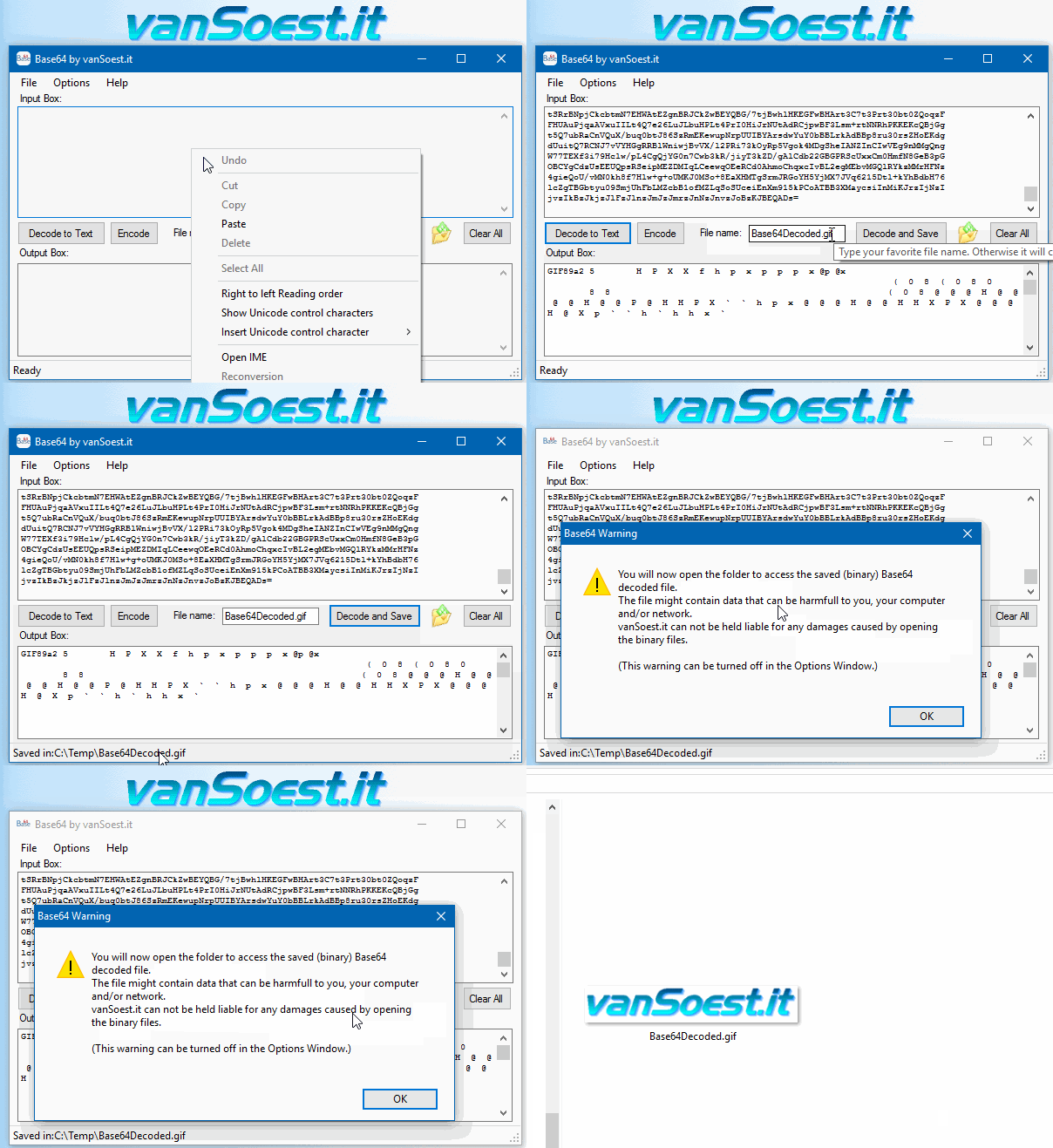 Copy everything between <Pass encoding = "base64"> and </Pass> into the text box. Now click on the "Decode to Text" button and the Output box will show your FileZilla password in plain text. |
Acer Veriton M200p500 Datasheet Pdf New [exclusive] May 2026Acer Veriton M200-P500 is a compact business desktop tailored for small office and home office (SOHO) environments. Often bundled with a 19.5-inch monitor, this system balances essential performance with commercial-grade security features like Core Specifications Overview Typically features AMD Ryzen™ 3 3200G (4C/4T, 3.6 GHz) or newer Ryzen 5 5600GT 4GB to 16GB DDR4 RAM (expandable up to 1TB 7200 RPM HDD or up to 1TB M.2 PCIe SSD Operating System Windows 11 Pro, Windows 11 Home, or Free DOS/Linux IntroductionThe Acer Veriton series has long been a staple in the realm of business and workstation computing, blending reliability with performance to meet the needs of both individual professionals and enterprise environments. The Veriton M200P500 is a notable entry in this lineup, designed for compact efficiency and versatility. Ideal for small offices or lightweight productivity tasks, this model emphasizes affordability, energy efficiency, and space-saving design. This article provides an in-depth overview of the Acer Veriton M200P500, highlighting its key features, technical specifications, and practical applications, supported by the insights found in its datasheet. acer veriton m200p500 datasheet pdf new Connectivity & Ports:
Related ResourcesThe Acer Veriton M200P500 boasts an impressive array of features that make it an attractive option for businesses seeking a reliable and high-performance desktop PC. Some of the key features of this computer include: Acer Veriton M200-P500 is a compact business desktop of this model's performance against the Intel-based Veriton M200-H series? Veriton M200-P500 Related Resources The Acer Veriton M200P500 boasts an |

Scripts and programming examples disclaimer
Unless stated otherwise, the script sources and programming examples provided are copyrighted freeware. You may modify them, as long as a reference to the original code and hyperlink to the source page is included in the modified code and documentation. However, it is not allowed to publish (copies of) scripts and programming examples on your own site, blog, vlog, or distribute them on paper or any other medium, without prior written consent.Many of the techniques used in these scripts, including but not limited to modifying the registry or system files and settings, impose a risk of rendering the Operating System inoperable and loss of data. Make sure you have verified full backups and the associated restore software available before running any script or programming example. Use these scripts and programming examples entirely at your own risk. All liability claims against the author in relation to material or non-material losses caused by the use, misuse or non-use of the information provided, or the use of incorrect or incomplete information, are excluded. All content is subject to change and provided without obligation.